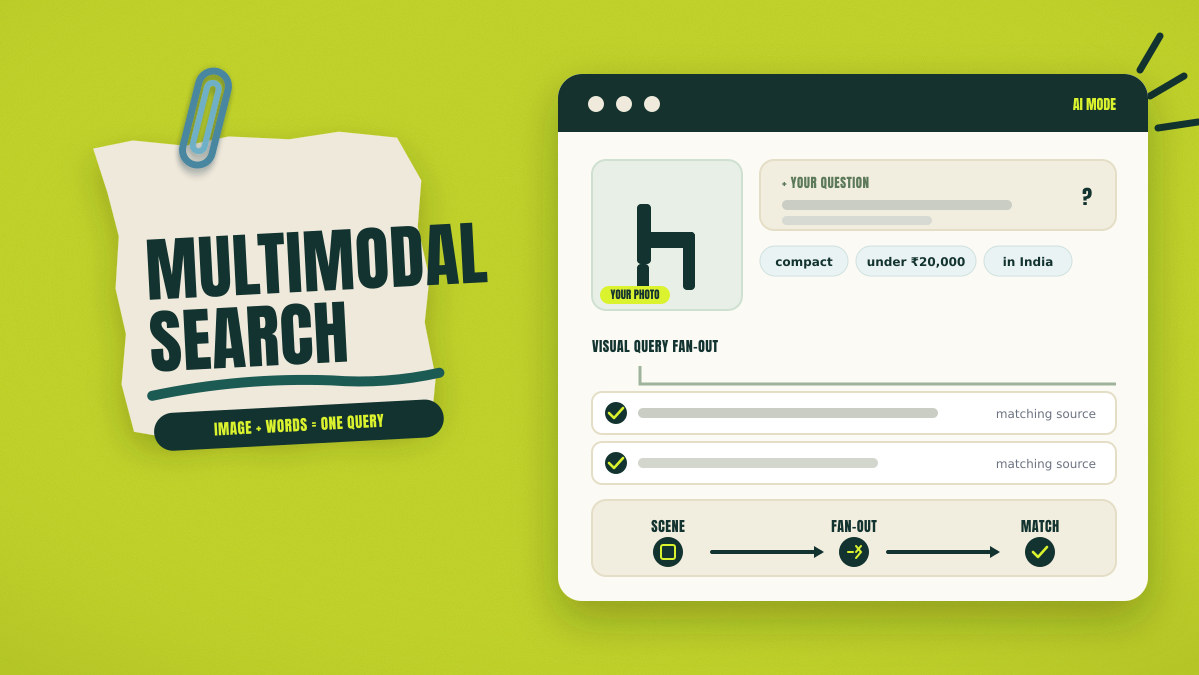
A shopper uploads a green chair photo and adds one purchase question. The shopper wants a compact option under ₹20,000, available across India. The request combines colour, material, size, style, price, and location.
Google AI Mode examines the whole scene and each separate object. It identifies materials, colours, shapes, and links between visible items, then splits one request into several related searches.
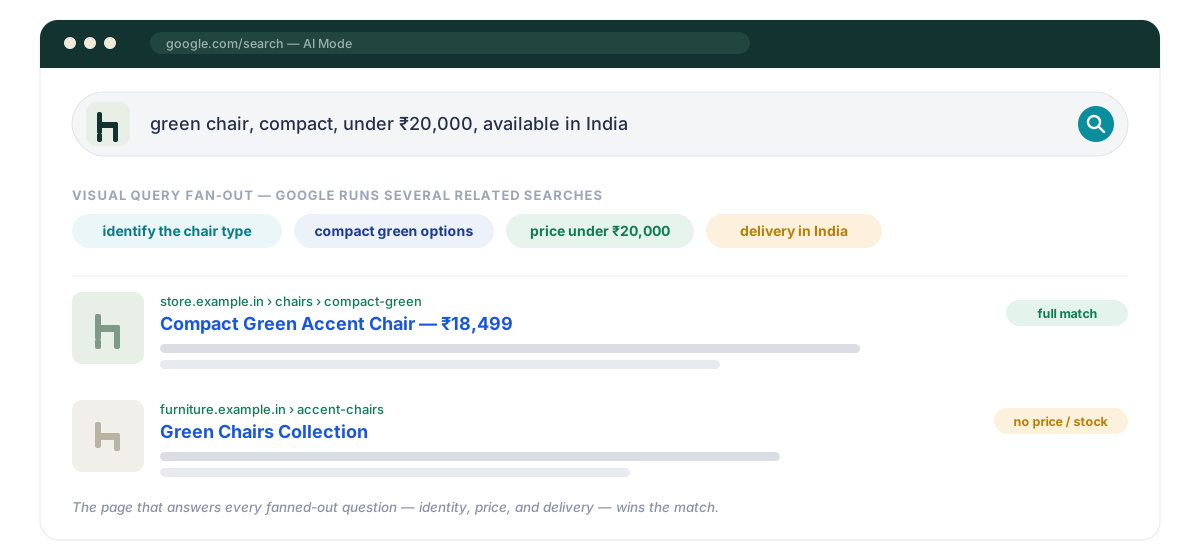
A useful page answers those related questions through copy and visuals. Copy names the object and covers details affecting each decision. Images show dimensions, materials, parts, scale, condition, or process. Metadata, schema markup, and product data must match visible facts.
What Is Multimodal Search?
Multimodal search combines several input types inside one request. A person may combine images, words, speech, video, files, or screen context.
Visual search uses an image as the main query. Multimodal search adds words, speech, or another media format. Multimodal retrieval finds sources matching both image and written details.
| Search type | Main input | Added context | Example result |
|---|---|---|---|
| Visual search | One image | Little extra context | Similar products or object identification |
| Multimodal search | Image with words or speech | Price, size, purpose, location | A refined answer with relevant sources |
| Multimodal retrieval | Image with written details | Page facts and source context | Sources matching the full request |
A plant photo may return visually similar leaves and species. Adding yellow spots and balcony shade creates a narrower question, and the result can address plant identity, symptoms, and suitable action.
Google Lens supports object discovery through images and camera input, while Google AI Mode adds follow-up questions and visual query fan-out.
How Does Multimodal Search Process an Image and Question?
A multimodal query passes through scene reading, query expansion, source search, and ordering. Each stage changes which facts help a page match.
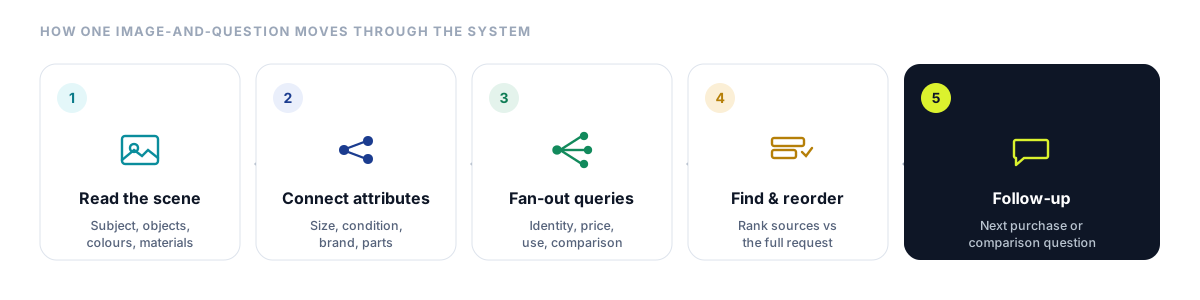
The System Reads the Whole Scene
The system first identifies the main subject inside the image. It then reviews other objects, visual context, materials, colours, and shapes. Those visual links help the system interpret the request.
A bookshelf photo may contain novels, headphones, plants, and storage boxes. The whole scene provides clues about category, use, style, and arrangement. Separate object finding creates several possible search directions.
The System Connects Objects With Details
The system connects each object with visible traits called attributes. Colour, material, size, shape, and condition all refine the request.
A hardback book has a title, author, cover colour, and edition. Headphones have brand marks, earcup shape, and visible control buttons. Each fact narrows possible sources and later questions.
The Request Produces Related Queries
Visual query fan-out creates several searches around one image. Purchase limits may include price, delivery area, stock, size, or material. Related searches may cover identification, use, product options, or comparisons.
A bookshelf request may create searches for separate books and headphones. Other searches may cover similar shelves, storage ideas, or plant names. Google’s AI features documentation describes multiple searches across the full image and separate objects.
This behaviour is the visual form of query fan-out, so one image can generate many parallel questions your page should answer.
Search Finds and Reorders Candidate Sources
Search systems collect pages, images, products, and related documents. They compare the image, written facts, page context, and source quality, then reorder candidate sources against the full request.
One page may identify the book but omit the edition. Another may show the edition while missing purchase details. A stronger source connects the exact cover with full book information.
The Result Supports Follow-Up Questions
The first answer may create another purchase or comparison question. A reader may ask about price, edition, delivery, or similar authors.
Complete facts help readers compare options and choose the next step. Link separate tasks to focused pages when deeper detail helps.
How Does Multimodal Search Change Content Planning?
Multimodal search optimization starts with one object and one reader task. Keywords describe the topic, while images add objects, details, and links. Later questions reveal which facts the page must cover.
A keyword brief may target leaking tap, pipe joint, and water leak. Those phrases name topics but omit part names and fault locations. Writers still lack the questions each image must answer.
A practical multimodal content strategy maps each object to one reader decision. The brief records visible details, reader limits, required answers, and source proof. A leaking joint brief needs pipe type, part location, tools, and safety limits.
Begin With One Main Object
Choose one exact product, place, part, system, or process. Use the same identity across headings, copy, images, and product data. Create another page when a different object serves a separate task.
A page about a compression joint should focus on that joint. A full pipe replacement deserves a separate how-to page. The first page can link there after the joint diagnosis.
Map Details Affecting Decisions
Select details that help readers identify, compare, use, or buy items. Useful details include colour, material, size, condition, price, location, and stock. How-to pages also need part names, tool sizes, and safety limits.
Avoid collecting every visible detail from every image. Wall colour adds little value during a pipe joint diagnosis. Focus on details that change the reader decision.
Connect Objects Through Factual Links
Connection sentences show why two entities appear together. They replace separate noun lists with facts readers need.
The compression nut holds the sealing ring around the pipe. The sealing ring blocks water around the joined surfaces. A worn ring can cause a leak near the joint.
Map the Next Decision
Finding the faulty part rarely ends the full task. Readers may compare parts, check tool sizes, or contact a plumber. Safety limits should appear before any action carrying risk.
A focused page can answer related joint questions in one place. Google recommends useful, people-first pages and discourages mass pages built only for fan-out variations.
How Should Page Copy Support Each Image?
Page copy must provide facts the image cannot show alone. A photo may show a control panel, while copy names each function. An image landing page places those facts near the visual.
Consider a washing machine panel with six programme icons. The photo shows button positions and icon shapes. Nearby copy names each programme, temperature range, and fabric use.
Place each important image near a heading naming its subject. Add a caption when size, date, location, or status needs emphasis. Put technical facts beside visuals where readers compare visible options.
Screenshots need written steps beneath the relevant interface image. Fault diagrams need part names, warnings, and action limits nearby. Charts need values, dates, sources, and method notes.
Visual search optimization needs direct links between pictures and related facts. A panel photo shows controls, while copy states each function. The next link can open a programme comparison page.
How Should Image Production Change for Multimodal Search?
Start image creation with one reader question and one expected decision. Each visual must show an object, detail, process, comparison, or result.
Product Images Must Show Purchase Details
Product galleries must answer questions affecting purchase decisions. One front photo rarely shows scale, depth, texture, controls, or package contents. Each useful angle needs a separate purpose.
A running shoe page may need side, sole, heel, and top views. A material close-up shows mesh texture and stitching. A foot photo shows shape and scale during use. Variant photos must present the correct colour and material. Google’s image SEO guidance recommends relevant, high-quality images placed near matching page content.
Comparison Images Need Matching Test Conditions
Comparison photos need matching angle, crop, distance, lighting, and scale. Shared conditions help readers compare visible differences accurately.
Record dates, equipment, and test details when claims need checking. Comparison images show differences, while test records support the cause.
Every Visual Needs an Image Brief
The image brief names the subject, question, required angle, and visible detail. The brief also names the supporting paragraph and reader decision.
A sole photo may answer a grip question. A heel photo may answer a support question. A top view may answer a width question.
How Should Text and Images Support the Same Subject?
Text and images must describe the same object, version, details, and purpose. Mismatched facts weaken reader trust and search relevance.
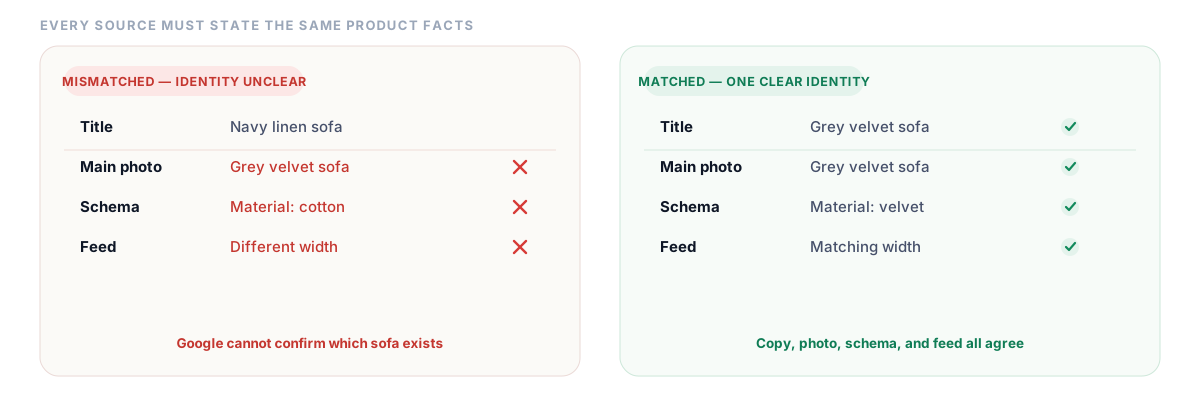
Consider a sofa page with mismatched variant facts. The title names a navy linen sofa. The main photo shows a grey velvet version. Schema markup lists cotton, while the photo shows velvet.
Merchant Center may receive another width or colour value. Readers then struggle to confirm the available sofa, and mismatched facts leave the product identity uncertain.
A corrected page uses matching facts across every published source. The title, photo, caption, product facts, schema markup, and product feed must match.
Strong multimodal SEO depends on matching facts across every published source. Product colour, material, size, price, and stock need matching values. Review every source from page title through product feed. Google requires schema markup to match visible page facts.
How Should Alt Text, Filenames, Captions, and Page Copy Work Together?
Each image text field serves a separate purpose. Alt text describes content images for people using screen readers. Filenames provide Google with a small clue about image subject.
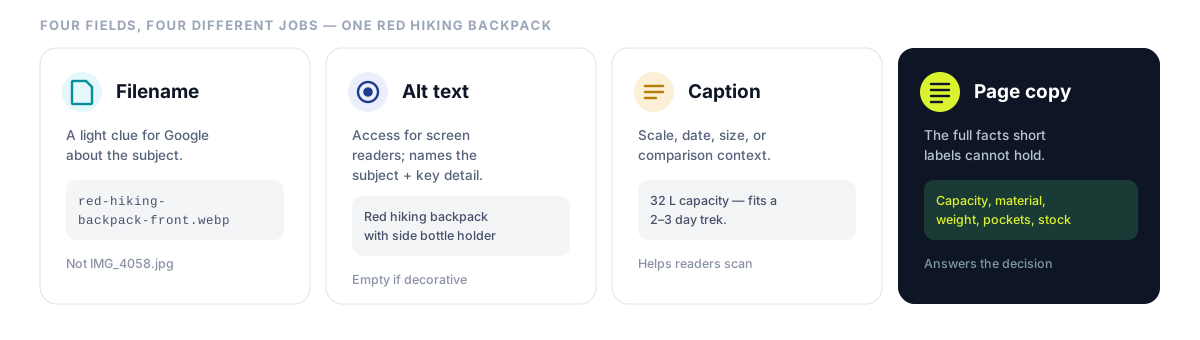
Captions add sizes, dates, locations, or comparison details. Page copy holds facts that short labels cannot contain. Those fields work together without repeating identical wording.
Consider a detailed photo of one red hiking backpack. Its filename, alt text, caption, and copy perform different jobs, and each field adds details suited to its purpose.
Filename
Use a short filename that identifies the main image subject. Use red-hiking-backpack-front-view.webp for the primary photo. Generic camera filenames provide few useful subject clues.
Google treats filenames as light clues about image subject. Nearby copy and alt text provide stronger subject clues.
Alt Text
Write alt text around the image purpose within its page context. Name the subject and any visual detail needed for access. Avoid repeating complete sentences already presented beside the image.
Use “red hiking backpack with front pocket and side bottle holder.” Decorative images need empty alt text because they add no useful content. Clickable images need text describing their link or purpose.
Caption
A caption adds scale, date, size, location, or comparison context. The caption adds details beyond the alt text.
A specific caption helps readers scan sizes before reading full product facts. The backpack caption may mention capacity and suitable trip length.
Page Copy
Page copy holds capacity, material, weight, pockets, warranty, and stock. Those facts answer questions one image label cannot cover.
Complex visuals need short alt text and full details nearby. The W3C complex-images guidance recommends short summaries with full written details close to the visual.
Which Technical Image SEO Checks Support Multimodal Discovery?
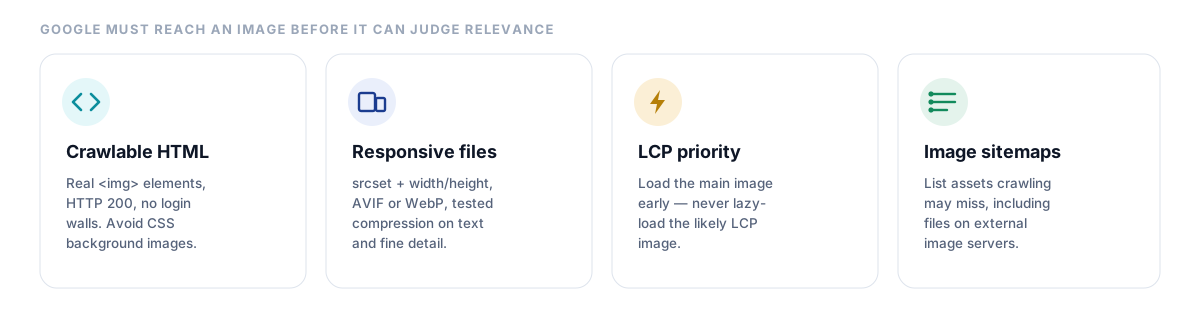
Google must reach an image before it can assess relevance. Crawlable HTML, stable URLs, responsive files, and loading order support discovery.
Make Every Important Image Discoverable
Use standard HTML image elements for content page images. Include a valid source inside each responsive image pattern. Allow Googlebot and Googlebot-Image to reach pages and image files.
Important image URLs must return an HTTP 200 status without login barriers. Stable URLs reduce duplicate crawling and preserve cached image files. Reference the same image through one stable URL.
A recipe page offers a natural technical example. The hero dish photo should use a standard image element. CSS background images remain outside standard Google image indexing.
Deliver Suitable Image Sizes
Responsive sources match image size with screen width and display sharpness. Width and height values reserve layout space before image delivery. The browser then chooses a suitable file.
Use AVIF or WebP where quality and browser support meet requirements. Retain accurate file extensions and browser-ready fallback formats. Test compression against texture, text, edges, and small details.
Prioritise the Main Visible Image
Largest Contentful Paint measures when the main visible content block appears. The main image needs early discovery and higher loading priority. Avoid lazy loading for the likely LCP image.
Use lazy loading for gallery photos below the first screen. Limit high priority requests across competing images. Check Core Web Vitals after major layout or image changes, and coordinate these fixes with wider technical SEO work.
Use Image Sitemaps for Hidden Assets
Image sitemaps list assets normal crawling may miss, including files stored on external image servers.
Use image sitemaps when normal crawling may miss important assets. Submit updated sitemap data after major catalogue or image changes.
How Do Schema Markup and Product Feeds Support Visual Discovery?
Schema markup presents visible page facts in a format Google can read. Product feeds add variant, price, stock, shipping, and ID data.
Page Schema Describes Visible Facts
Product schema describes the item shown on the page. ProductGroup schema connects variants sharing one base product. Offer schema contains price, stock, shipping, and return details.
Imagine a ceramic mug sold in three colours. Each colour needs matching photos, variant facts, and one shared product group. Every schema property must match visible page facts. Google’s product structured data can support richer product results across Search, Images, and Lens.
Merchant Center Adds Shopping Data
Merchant Center publishes product titles, IDs, variants, images, prices, and stock. It also publishes shipping and return details. Variant data must match the photo and landing page.
Page schema describes facts on the product URL. Merchant Center shares shopping data across supported Google surfaces. Accurate shopping data helps Google match products with eligible results across Search and Lens.
Image Metadata Supports Ownership and Rights
IPTC metadata stores creator and licence details inside image files. ImageObject schema publishes the same details on the page.
Mismatched metadata can publish the wrong creator, credit, or licence. Google uses schema facts when schema and IPTC values conflict.
Schema markup cannot create unsupported facts or guarantee visual placement. Google provides no special schema type for AI Mode, and existing search requirements still apply across images and product pages.
How Does Multimodal Search Affect Ecommerce Pages?
Ecommerce pages need accurate variants, full product details, and matching shopping data. A product photo prompts questions about size, colour, price, stock, and delivery.
A shopper uploads a blue cotton kurta photo and asks one purchase question. The request seeks a medium size under ₹2,000 with Delhi delivery. The image contributes colour, pattern, sleeve length, and visible fabric texture.
The weak page omits size chart, fabric, pattern, stock, and delivery areas. Those missing facts block size, price, fabric, and delivery decisions. One photo cannot show sleeve, back, texture, and garment length.
A stronger page publishes the exact name, size chart, fabric, price, and stock. It adds front, back, sleeve, fabric, and model photos, and each important variant receives accurate images and identifiers.
Product image optimization for Google Lens starts with accurate variant photos. Product data must match title, colour, fabric, price, and stock. Merchant Center images must match colour, pattern, and material values.
The shopper can now compare appearance, size, price, stock, and delivery. One complete page supports product discovery, comparison, and purchase without duplicates.
How Does Multimodal Search Affect Diagrams, Screenshots, and How-To Pages?
How-to pages need visuals identifying parts, locations, actions, and outcomes. Written copy must preserve every safety step and essential fact.
A Bicycle Chain Diagram
A cyclist uploads a chain photo and asks about a loose section. The page must identify the chain, derailleur, tension point, and fault location.
Useful visuals include the full drivetrain and a labelled close-up. A diagram shows chain direction and derailleur position. Another close-up shows the loose section from the correct angle.
The written instructions must cover safe handling and suitable tools. They must also name cases requiring trained workshop support. Visual evidence cannot replace important safety facts.
A Software Screenshot
A designer uploads an export panel screenshot and asks about transparency. The copy must compare PNG, SVG, and JPEG for that task.
PNG supports transparent backgrounds across raster graphics. SVG supports scalable vector graphics and interface artwork. JPEG supports compressed photos without transparent backgrounds.
The screenshot must show the correct export menu and control labels. Written steps must match the current interface version. A final screenshot displays the exported file properties.
A Data Chart
A chart needs short alt text and a visible summary. Readers also need every important value and time period. Source details and the test method belong beside the chart.
Describe observed trends without overstating any cause. Use matching scales and labels across comparison charts. Search systems can also read published chart facts.
Add video only when motion improves comprehension. Suitable cases include assembly, tool movement, interface sequences, and physical demonstrations. Written steps and accurate thumbnails must support every video.
How Should Teams Measure Multimodal Search Performance?
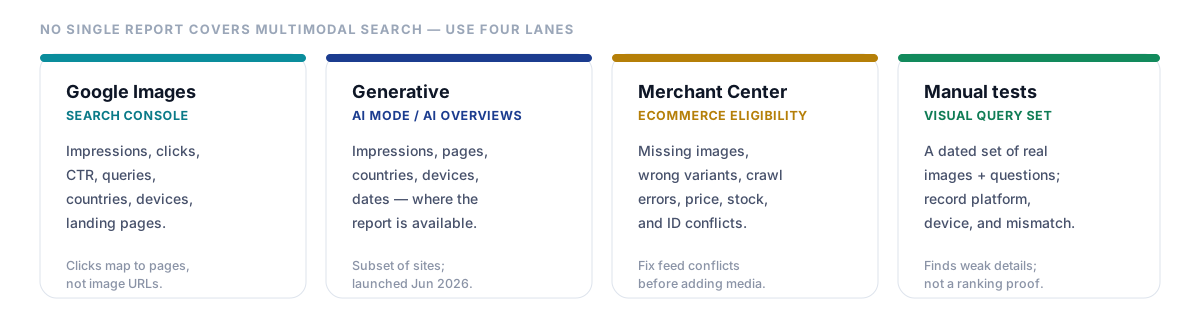
No single report measures every multimodal search result. Use separate reports for image search, products, video, and AI exposure.
Measure Google Images Performance
Search Console lets teams filter reports for Google Images. Review impressions, clicks, click-through rate, queries, countries, devices, and landing pages. Click-through rate shows how many impressions produced a click.
Google assigns image search clicks to landing pages. The report omits each direct image URL.
Compare branded and non-branded visual queries separately. Review pages receiving impressions without useful click activity. Review live image results before changing major visuals or copy.
Measure Generative Search Visibility
Google launched generative AI performance reports on June 3, 2026. The reports cover impressions, pages, countries, devices, and dates, and Google currently offers them to a subset of websites.
Track AI Mode and AI Overview exposure where available. Compare visibility across major revisions and publishing periods. Avoid linking one exposure change to one isolated edit.
Measure Ecommerce Eligibility
Review Merchant Center for missing images, wrong variants, and crawl errors. Check price, stock, colour, product ID, shipping, and landing-page conflicts.
Resolve feed conflicts before adding more product media. Accurate shopping data helps Google match products with eligible results.
Test Visual Queries Manually
Create a dated test set using representative product and how-to images. Add written details covering price, size, location, product use, or purpose. Record platform, device, country, result type, and each mismatch.
Manual testing reveals weak details and incorrect variants. It cannot establish a stable ranking or direct cause.
Traffic growth after an image update only confirms shared timing. Several ranking systems affect the same reporting period. Report the change without claiming one edit caused it.
What Should Teams Optimize First?
Begin with pages where visuals influence discovery, comparison, or purchase. Fix factual conflicts before creating new media.
Fix technical problems blocking important image access first. Move important content images into crawlable HTML. Open blocked resources and correct broken image responses.
Next, resolve mismatched facts across copy, schema markup, and product feeds. Then add missing product angles, diagrams, screenshots, scale photos, or full chart details.
Afterward, expand video, Merchant Center data, or visual query testing. Add each format only when it answers a distinct reader question. Media volume alone cannot improve search relevance.
Create a visual when it answers a question efficiently. Add copy when the visual cannot contain every needed fact. Add schema markup when visible content supports each property.
Publish another page when a separate task needs enough original detail. Group connected questions when one page answers them fully.
Build Every Page Around One Image-Led Task
The green chair photo created several hidden questions. Colour, material, size, price, delivery, and room size shaped source matching. One complete page answered them through matching copy, images, and product data.
Begin with one image-led customer task for each page. Audit every page element supporting that task. Remove conflicts across copy, images, metadata, schema markup, and product data.

Manish Singh is Head of Generative AI at SEO Noida and has 14+ years of experience in SEO, UX, and digital marketing. He focuses on how Google and AI platforms find, interpret, and cite web content. His articles cover AI SEO, GEO, AEO, LLM SEO, entity optimization, content architecture, and visibility measurement, drawing on website audits and campaign work.