What is GPTBot?
GPTBot is OpenAI’s crawler for web content that may be used in training OpenAI’s generative AI foundation models. OpenAI says disallowing GPTBot indicates that a site’s content should not be used for that training.
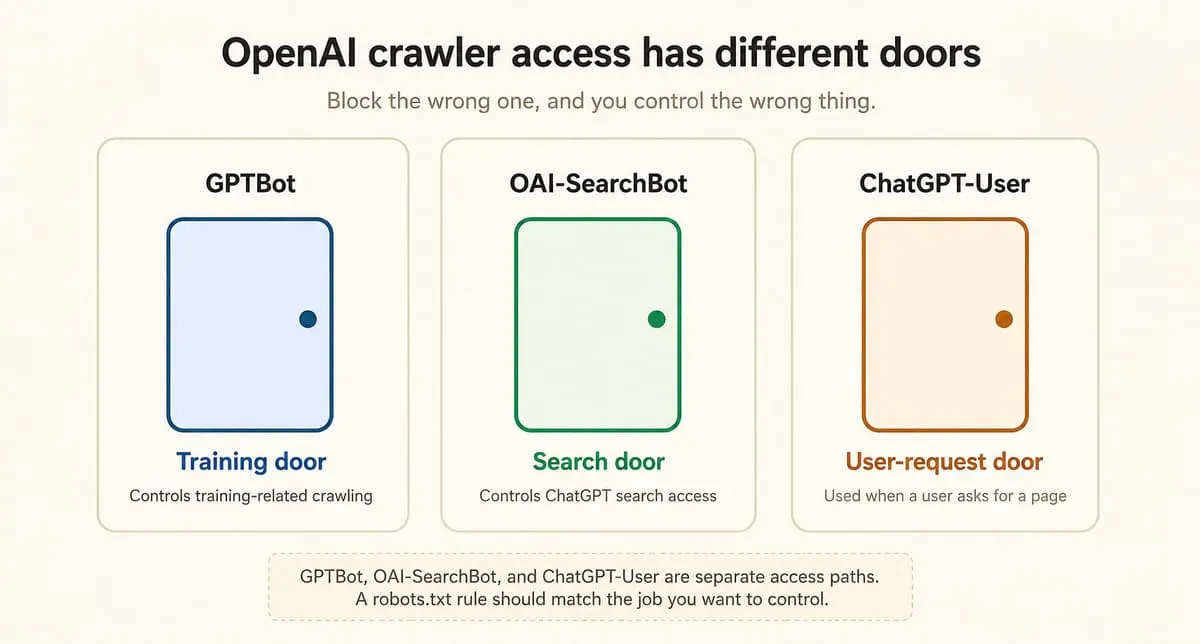
Think of your website as a building with different doors.
- GPTBot is the training door.
- OAI-SearchBot is the search door.
- ChatGPT-User is the user-request door.
That split matters. If you block the wrong door, you may get the wrong result.
For robots.txt, the crawler token is:
OpenAI’s current documented GPTBot user-agent string includes GPTBot/1.3. Use OpenAI’s live crawler documentation when you need the full string or current IP source.
What is GPTBot not?
GPTBot is not OAI-SearchBot, ChatGPT-User, or OAI-AdsBot. OpenAI lists these as separate agents with separate purposes, so one robots.txt rule should not be treated as control for every OpenAI product behavior.
| Agent | Job | Use in plain words |
|---|---|---|
| GPTBot | Crawls content that may be used for model training | Training access |
| OAI-SearchBot | Surfaces websites in ChatGPT search features | Search visibility |
| ChatGPT-User | Visits a page because a user action asked for it | User-triggered access |
| OAI-AdsBot | Checks pages submitted as ads on ChatGPT | Ad safety and relevance checks |
The common mistake is simple: people say “block ChatGPT” when they really mean “block training.” Those are not the same action.
If you want ChatGPT search visibility, look at OAI-SearchBot. If you want to opt out of training-related crawling, look at GPTBot.
What can robots.txt do for GPTBot?
A robots.txt file can tell cooperative crawlers which parts of a site they may crawl. It is a crawl instruction file, not a password, login wall, or security system. RFC 9309 says robots rules are not access authorization.
That means robots.txt is like a sign on a door.
- A cooperative visitor follows it.
- A sign is still not a lock.
Use robots.txt for crawl control. Use real access control for private pages, paywalled systems, admin URLs, staging sites, and sensitive files.
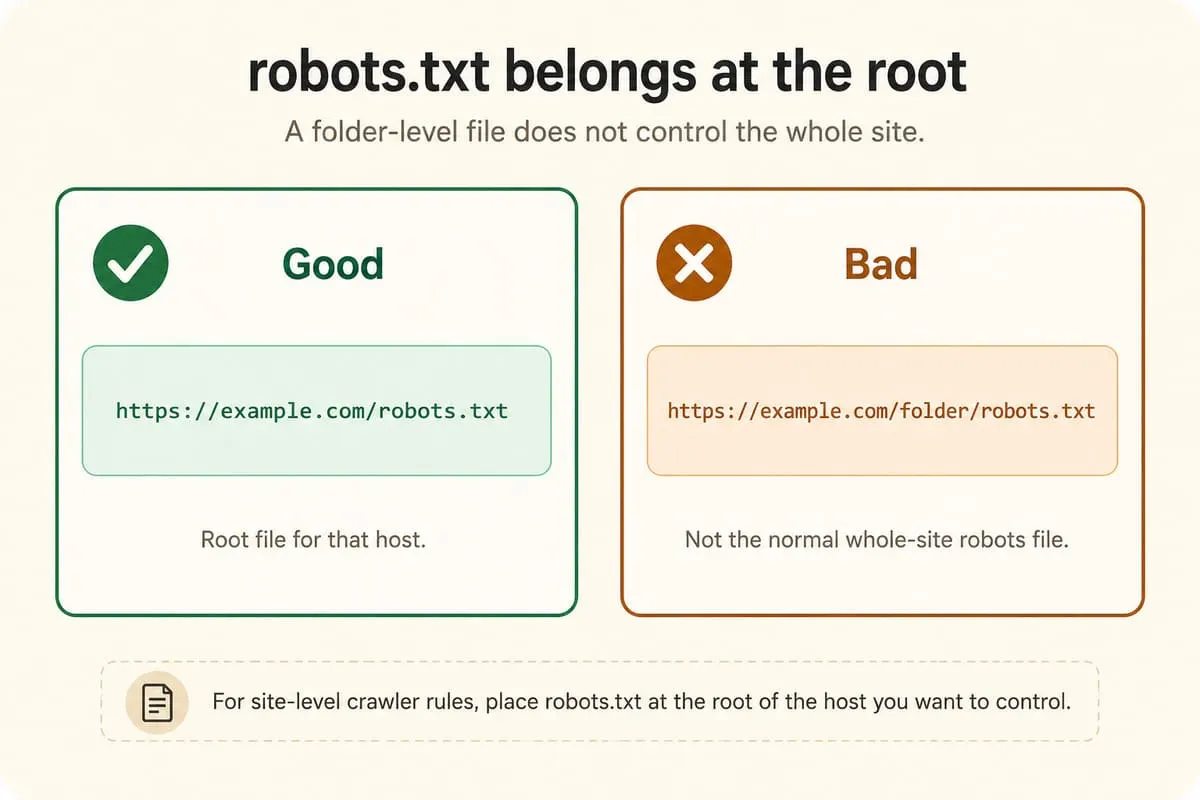
Google’s robots.txt documentation gives an important placement rule: the file must sit in the top-level directory, and its rules apply only to the host, protocol, and port where that file is hosted.
Good:
Bad for whole-site control:
How do you block GPTBot?
To block GPTBot across a whole site, add a GPTBot group to the root robots.txt file and disallow the root path.
The first line names the crawler. The second line blocks crawling from the site root.
To block one folder:
To block one page:
Do not add a rule and assume it worked. Check the live robots.txt URL, then check server logs after the change.
How do you allow ChatGPT search but block GPTBot?
To allow ChatGPT search while blocking training-related GPTBot crawling, allow OAI-SearchBot and disallow GPTBot. OpenAI says these settings are independent.
Use this pattern:
This sends two different instructions:
- OAI-SearchBot may crawl for ChatGPT search features.
- GPTBot should not crawl for training-related use.
OpenAI says sites that block OAI-SearchBot will not be shown in ChatGPT search answers, though they may still appear as navigational links. OpenAI’s publisher FAQ also says content needs OAI-SearchBot access to be included in summaries and snippets in ChatGPT.
How is noindex different from blocking GPTBot?
robots.txt controls crawling. noindex controls indexing. If a crawler cannot access a page, it may not be able to read the page’s noindex instruction.
Use this rule of thumb:
| Goal | Better tool |
|---|---|
| Stop GPTBot from crawling training-related content | robots.txt rule for GPTBot |
| Stop a page from being indexed or shown as an indexed result | noindex |
| Keep private content private | Login, server permissions, or other access control |
| Allow ChatGPT search but block training-related crawling | Allow OAI-SearchBot; block GPTBot |
OpenAI’s publisher FAQ gives the same practical warning for ChatGPT Atlas: if OpenAI gets the URL of a disallowed page from another source, it may still surface the link and page title; if you do not want that, use noindex, and allow the crawler to read the page so it can see the tag.
How do you verify GPTBot in logs?
To verify GPTBot, check the user-agent string and compare the request IP against OpenAI’s published GPTBot IP ranges. A user-agent string alone can be copied, so IP verification is the stronger check.
Use this as an example format only:
Check the request line first: it should name GPTBot in the user-agent string.
Then check crawler behavior: it should request or respect /robots.txt.
Finally, check the IP: it should match OpenAI’s current GPTBot IP publication.
Do not paste an old IP list into a permanent firewall rule and forget it. Treat OpenAI’s live IP publication as the reference.
What mistakes should site owners avoid?
The biggest GPTBot mistake is blocking the wrong OpenAI agent. GPTBot, OAI-SearchBot, ChatGPT-User, and OAI-AdsBot do different jobs.
Cut these mistakes first:
- Blocking GPTBot does not manage ChatGPT search visibility.
- Blocking OAI-SearchBot may stop your site from appearing in ChatGPT search summaries.
- robots.txt is not security for private content.
- Disallow is the wrong tool when you really need noindex.
- Subdomains need their own check. A root file on example.com does not control blog.example.com.
A clean GPTBot setup starts with the exact goal. Training opt-out, search visibility, indexing removal, and private access are four different jobs.
What should an SEO team choose?
An SEO team should choose GPTBot rules by separating training access from ChatGPT search access. If you want search visibility but not training-related GPTBot crawling, allow OAI-SearchBot and disallow GPTBot.
| Goal | Robots direction |
|---|---|
| Allow OpenAI training-related crawling and ChatGPT search crawling | Allow GPTBot and OAI-SearchBot |
| Allow ChatGPT search but block GPTBot | Allow OAI-SearchBot; disallow GPTBot |
| Block OpenAI automated search and GPTBot crawling | Disallow OAI-SearchBot and GPTBot |
| Remove a page from indexing | Use noindex, not just Disallow |
Common SEO setup:
This does not answer every policy, copyright, or legal question. It answers one technical question: which OpenAI crawler may access which part of your site.
Before publishing the rule, check the root file, subdomains, staging domains, and server logs. OpenAI says search systems may take about 24 hours to adjust after a robots.txt update.

Manish Singh is Head of Generative AI at SEO Noida and has 14+ years of experience in SEO, UX, and digital marketing. He focuses on how Google and AI platforms find, interpret, and cite web content. His articles cover AI SEO, GEO, AEO, LLM SEO, entity optimization, content architecture, and visibility measurement, drawing on website audits and campaign work.