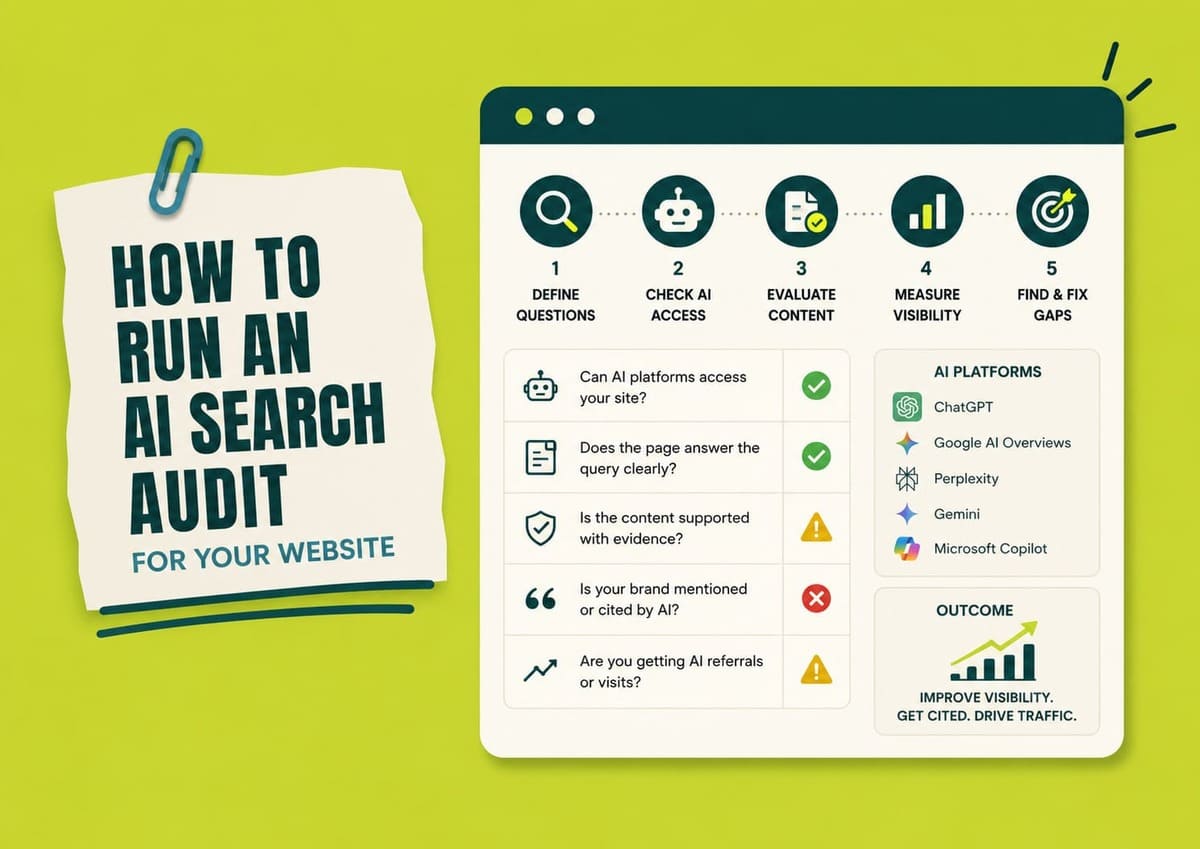
An AI search audit shows where the path from a user’s question to a visit, lead, or sale breaks.
Don’t start by changing schema, adding FAQs, or rewriting pages. Find the problem first.
Follow this path:
reach and readability
page ownership
answer and evidence
existing data
AI search tests
source tracing
diagnosis
fix and check again
A missing ChatGPT citation can have several causes. OAI-SearchBot may not reach the page. No suitable page may answer the question. Information may be weak or outdated. ChatGPT may rely on another source instead.
Each problem needs a different fix.
Google applies the same Search foundations to AI Overviews and AI Mode. A supporting page must be indexed and eligible to appear with a Search snippet, and Google says there are no additional technical requirements just for appearing in these features.
Run Your AI Search Audit Step by Step
Create 1 working sheet before you start.
Begin with:
|
Platform
|
Question
|
Candidate page
|
Evidence
|
Result
|
Problem
|
Fix
|
Owner
Use Pass, Fail, or Unknown. Choose Unknown when the evidence is not enough to decide.
Step 1. Set the Platforms and Questions You Will Audit
Start with AI search products your customers use or your business needs to measure.
For most sites, that means choosing from:
You do not need to test every AI product.
For each platform, note:
Next, list questions customers genuinely need answered.
Useful sources include:
Focus on tasks rather than isolated keywords.
Questions may cover:
Make each question specific enough that its result tells you what to investigate.
For high-value questions, create a few natural wording variations while keeping the intent unchanged.
“Which accounting software works for a small agency?” and “What accounting software should a small agency use?” can belong to the same question family.
Don’t force a fixed prompt count. Add questions until your main customer tasks are covered.
Keep the question set unchanged during the audit. If the scope changes, save a new version rather than mixing new questions into the old baseline.
Step 2. Verify Each Platform Can Reach and Read Your Pages
You do not need to inspect every URL first.
Start with pages connected to your priority questions. Expand into a broader technical crawl only when evidence suggests the problem affects more of the site.
Take each candidate page and check whether the search system can retrieve the content needed to answer the question.
Don’t use 1 generic “AI crawler” check.
Google-Extended is different. Google says it can control certain Gemini training and grounding uses, but it does not affect inclusion or ranking in Google Search.
For each page, check:
200noindex where indexing matters403, 429, CAPTCHA, or another challengeFor Google Search, minimum technical requirements include allowing Googlebot, returning HTTP 200, and providing indexable content. Meeting those requirements still does not guarantee indexing or serving.
Check the server and firewall as well as robots.txt. A crawler can be permitted in robots.txt and still fail at the WAF, CDN, authentication, or rate-limit layer.
If logs are available, save:
URL
time
response code
Where a platform provides bot verification or IP information, use it rather than trusting a User-Agent string alone. Bing specifically warns that User-Agent strings can be spoofed and provides Bingbot verification guidance.
Finish each page with:
A useful finding is:
product page
OAI-SearchBot allowed
firewall returns
403Fail
This step tells you if page retrieval is blocked. It does not tell you if the page will be cited.
Step 3. Match Each Audit Question to the Page That Should Answer It
Take every question from Step 1 and ask:
Which page should give the best complete answer to this question?
Start with your CMS, sitemap, or site crawl. Use a site: search only as a secondary discovery check, not as your complete site inventory.
Then inspect what each candidate page is actually meant to do.
Assign 1 state:
Suppose someone asks, “How much does project-management software cost for a 50-person team?”
A site may have both a product page and a pricing page. Keyword overlap does not decide ownership. The page responsible for the pricing decision should own the answer.
A missing owner does not automatically require a new URL.
The answer may belong:
For each question, save:
owner page
ownership state
action
Actions may include keep, expand, merge, reassign, review a new page, or exclude.
Finish when each important question has 1 owner, a deliberate content gap, or an explicit exclusion.
Step 4. Check Each Page Gives a Clear, Current, Supported Answer
Now audit the content on each owner page.
Use 4 checks.
1. Can you find the answer?
Ask:
Can I point to 1 sentence or short block that answers this question?
If not, mark the answer as missing.
Audit what the page says now. Don’t improve the copy yet.
2. Does evidence support the answer?
Break important statements into individual claims.
“Product X is fastest and reduces reporting time by 40%” contains at least 3 claims:
Each claim needs support.
For important claims, save:
source
date or version
scope
limitation
Use:
When several websites repeat the same statistic or claim, trace them back to the original source.
If 5 articles repeat the same original study, you still have 1 independent evidence source, not 5.
3. Is the information still current?
Recheck facts that can change quickly, including:
Old evidence is not automatically wrong. Time-sensitive claims simply need current verification.
4. Do names, facts, and qualifiers agree?
Check company names, products, services, locations, current roles, versions, and acronyms across page copy and structured data.
Keep important conditions next to the claim they change.
If evidence applies only to a particular country, version, sample, or date, state that beside the claim instead of leaving the main sentence sounding universal.
This is also where you can reject supposed AI-optimization shortcuts.
Google says Google Search does not use
llms.txt for visibility, does not require special Schema.org markup for generative AI Search, and does not require content to be broken into tiny chunks for AI systems.
Use structured data for its normal purpose and keep it consistent with visible content.
Finish each page with:
Save the problem before trying to fix it.
Step 5. Collect the AI Search Visibility Data You Already Have
Before manual testing, collect data already available from logs, search platforms, analytics, and conversion tracking.
You do not need a paid AI-visibility platform to run the core audit. Paid tools can expand monitoring, but first-party logs, webmaster tools, analytics, and controlled platform tests can provide the evidence needed for basic diagnosis.
Keep each signal separate.
utm_source=chatgpt.com, allowing publishers to identify inbound ChatGPT Search traffic.This tells you a request happened. It does not prove a citation.
If your property does not have the report, mark it Not available, not
0.
Use Bing data to answer 2 practical questions:
A grounding query is a grouped phrase, not the user’s exact prompt.
Save:
Use measurement states consistently:
0your measurement system worked and recorded zeroKeep these 4 datasets separate:
AI appearances or citations
AI referrals
conversions
Choose a baseline period that gives enough data for your site. A low-volume B2B site may need a longer observation window than a high-traffic publisher.
Use this baseline to decide where manual testing should begin. If native data already shows that a page receives citations but referrals are weak, you do not need to start by assuming a crawl problem. Move to the part of the audit that can explain the gap between citation and visit.
Step 6. Test Your Questions Across AI Search Platforms
Now run controlled tests using the question set from Step 1.
For each run, save:
If a state cannot be observed, mark it Unknown.
Use a fresh conversation for independent tests where possible. Previous conversation context can affect later responses.
Run the exact stored question and keep every valid result.
Don’t keep rerunning until you get the answer you wanted.
Save:
question
answer
cited sources
brand state
competitors
factual errors
Classify the brand result simply:
Citation is a separate field. A brand can be mentioned without its site being cited.
Referral is separate too. Check analytics rather than inferring a visit from the answer.
Repeat high-value questions when 1 result is not enough to support the decision.
A 2026 preprint that repeatedly sampled Perplexity Search, OpenAI SearchGPT, and Google Gemini found substantial variation in citation distributions across repeated runs and argued that single-run visibility estimates can look more precise than the underlying results justify.
That finding does not create a rule such as “run every prompt 10 times.”
Use a decision-based stopping test instead:
After each batch, ask whether another comparable run could realistically change the conclusion you would report.
If the result keeps switching between not mentioned, mentioned, and recommended, report the finding as unstable instead of forcing a precise percentage.
Test natural wording variants separately:
When reporting a rate, show the denominator.
That 60% describes your test panel, not market share.
Automation is fine when it preserves:
Avoid automated monitoring that hides its sampling method or silently removes unfavorable observations.
Step 7. Trace the Sources Behind Important AI Answers
A citation count does not tell you whether the cited source supports the answer.
Trace sources for high-value claims, recommendations, prices, comparisons, current facts, negative statements, and factual errors.
Use 5 actions:
If an answer says a company specializes in enterprise cybersecurity, has offices in 3 countries, and costs less than a competitor, those are 3 separate claims. Check each one.
Classify support as:
For important claims, use human review rather than relying only on another AI model to judge citation support.
AttributionBench, published in Findings of ACL 2024, found that automatic attribution evaluation remains difficult even for strong language models; the authors traced many errors to nuanced information that models failed to handle correctly.
Then classify the source as:
Check freshness too. A source can accurately describe an old state and still be wrong for a current answer.
For brand information, use:
If an important AI claim has no visible citation, mark the source as Unknown.
Do not guess where the model got the information.
Compare cited sources with your own page.
Ask:
Don’t jump from “this publisher gets cited” to “we need a backlink.”
Compare the information first.
Step 8. Find the Earliest Problem Blocking Visibility
Now connect findings from Steps 1–7.
Find the earliest problem you can prove.
Record:
Then decide whether you have a content/evidence gap or an unresolved retrieval-selection question.
Do not call this a crawl problem without crawl evidence.
A 2026 SAGEO Arena preprint treats retrieval, reranking, and generation as separate stages and reports that optimization methods can behave differently when retrieval and reranking are included rather than assuming the candidate document is already present.
If the evidence is not strong enough to choose 1 diagnosis, collect more evidence instead of guessing.
Not seeing a citation in your test panel does not prove the platform cannot retrieve your site.
Step 9. Fix the Problem and Run the Audit Again
Fix the diagnosed problem, not everything around it.
Save:
change
owner
date
page version
check-again trigger
Match the fix to the problem:
Re-run only the steps affected by the change.
Check again when the relevant system has processed the change.
Useful triggers include:
Do not use a universal 7-day or 30-day rule. Google, for example, says recrawling can take from a few days to a few weeks and does not guarantee immediate inclusion.
Keep comparison conditions as similar as possible: same question version, platform, market, language, and classification rules.
If conditions changed enough to invalidate the comparison, mark the result Not comparable.
Report movement without claiming causation you cannot prove.
That is an observed change in the test panel.
It does not by itself prove that the page edit caused the difference.
Bing makes the same distinction in AI Performance: citation trends can reflect changes in user questions, your content, or the underlying AI systems, and the trends cannot be attributed to a single cause from the dashboard alone.
Close each finding as:
Publishing a fix does not close a finding.
Evidence does.
Know What Each Audit Signal Proves and What It Does Not
Each signal answers a different question.
| Signal | Supports | Does not prove |
|---|---|---|
| Crawler allowed | Crawler is permitted by that rule | Request reached the page |
| Verified crawler request | Crawler requested the URL | Page was cited |
| AI impression | URL appeared under that platform’s impression definition | Citation, click, or conversion |
| AI citation | Page or source was cited | Recommendation, click, or conversion |
| Brand mention | Brand appeared | Brand’s site supplied the information |
| Recommendation | Brand was suggested | User clicked or converted |
| AI referral | User visited from an AI source | Why the system selected the page |
| Conversion | A business outcome occurred | A specific SEO change caused it |
No citation in 1 run means only that no citation appeared in that observation. Missing dashboard data means the metric is unavailable, not 0.
A crawl problem, citation problem, and conversion problem require different fixes. Keep those signals separate instead of compressing them into 1 readiness score.
Build the Final AI Search Audit Report
Keep the report practical. Someone who did not run the audit should still know what failed and what to do next.
Include 6 parts:
Keep 1 change log so the next audit retains the baseline.
The executive summary should answer 5 questions:
The audit is complete when every important finding shows what was tested, the evidence behind it, the problem found, the required action, the owner, and the next check.
Find the problem first
An AI search audit shows where the path from a user’s question to a visit, lead, or sale breaks.

Manish Singh is Head of Generative AI at SEO Noida and has 14+ years of experience in SEO, UX, and digital marketing. He focuses on how Google and AI platforms find, interpret, and cite web content. His articles cover AI SEO, GEO, AEO, LLM SEO, entity optimization, content architecture, and visibility measurement, drawing on website audits and campaign work.